
Slow Wi‑Fi doesn’t always mean your internet plan is at fault. Sometimes the cause is the frequency band selected on the router. Many modern routers offer both 2.4 GHz and 5 GHz Wi‑Fi, but each has distinct characteristics. Understanding the differences between Wi‑Fi 2.4 GHz and 5 GHz helps you choose the network that best fits a bedroom, office, TV, or smart‑home device.
What’s the difference between 2.4 GHz and 5 GHz Wi‑Fi?
The numbers 2.4 GHz and 5 GHz indicate the radio frequency bands used to transmit data wirelessly. They are not measures of the internet speed provided by your ISP. Actual speed still depends on your internet plan, the capabilities of the router and devices, radio interference, distance, and the number of connected devices.
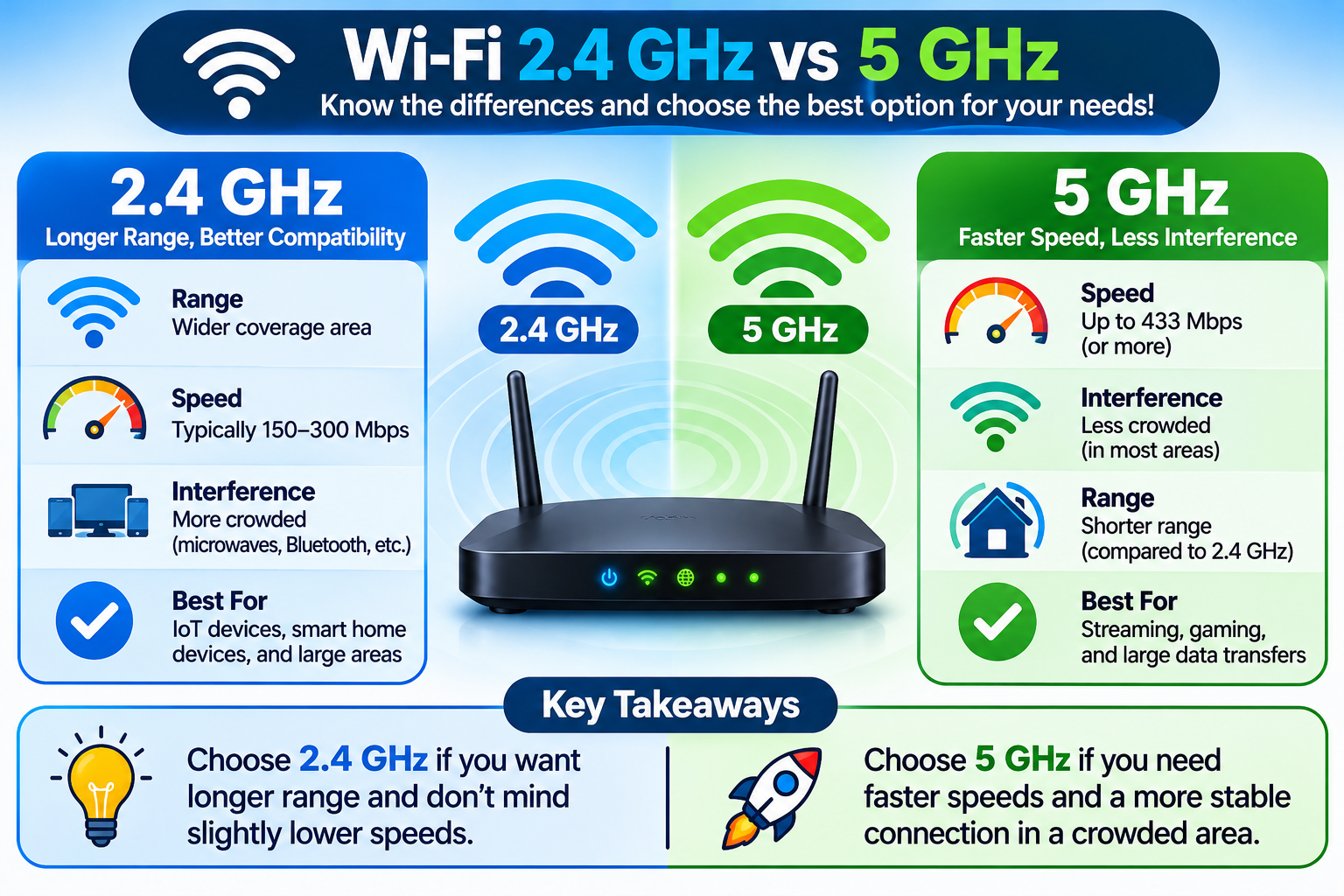
The 2.4 GHz band has been around for a long time and is supported by many devices, including smart‑home gadgets. The 5 GHz band offers more room for high‑speed channels on many router configurations, making it often more suitable for activities that require high throughput. However, the higher frequency tends to attenuate more quickly when passing through walls and other obstacles.
Advantages and disadvantages of 2.4 GHz Wi‑Fi
The main advantage of 2.4 GHz is its generally better range. Its signal often remains usable in rooms farther from the router, especially when there are several obstacles. Device support is also broad, so this band is frequently chosen for smart lights, sensors, cameras, and Internet‑of‑Things devices that don’t require high speeds.
The downside is that the 2.4 GHz band is more crowded. Bluetooth, other wireless devices, and neighboring Wi‑Fi networks can occupy nearby spectrum. Because the number of non‑overlapping channels is relatively limited, interference and network congestion can degrade performance. Devices that support only 2.4 GHz also won’t benefit from a 5 GHz network.
When should you choose 5 GHz Wi‑Fi?
Use 5 GHz when the device is close enough to the router and needs a fast or stable connection. Examples include a laptop for video meetings, a gaming console, a computer downloading large files, or a TV streaming high‑resolution video. In dense apartment or housing complexes, 5 GHz can also reduce competition with the many surrounding 2.4 GHz networks.
Don’t assume 5 GHz is always faster in every situation. If the router is on a different floor or blocked by a concrete wall, the 5 GHz signal can weaken faster than 2.4 GHz. In such cases, the stronger 2.4 GHz connection may feel more consistent even though its peak speed is lower.
Quick comparison
| Aspect | 2.4 GHz | 5 GHz |
|---|---|---|
| Range | Typically longer | Typically shorter |
| Obstacle penetration | Generally better | More prone to weakening |
| Potential speed | Sufficient for light activities, depending on devices and conditions | Generally higher on supported devices and routers |
| Network density | Often more crowded | Can be less congested, depending on the environment |
| Suitable devices | Smart devices and devices far from the router | Laptops, consoles, and streaming devices close to the router |
How to choose the right network at home
Start by testing the connection where the device is normally used, not just next to the router. Connect a phone or laptop to each band and run speed tests at roughly the same time. Compare download and upload speeds, latency, and stability over a few minutes. A single test result may not represent everyday conditions.
If the router broadcasts two separate SSIDs, choose the band based on need. Use 5 GHz for devices that are close and require high capacity. Choose 2.4 GHz for devices that are far away or only need minimal data. If the router uses a single SSID for both bands, a band‑steering feature can help devices pick the appropriate connection, but the final decision still depends on the router’s implementation and the client devices.
Make sure the router is placed in an open, fairly central area, not hidden inside a cabinet or behind large objects. Update the router’s firmware, use a strong Wi‑Fi password, and check whether the channel is overly congested. If a particular area of the house consistently has weak signal, adding an access point or a mesh system may be more effective than merely switching frequency bands.
Do older devices need to be replaced?
Not necessarily. Devices that support only 2.4 GHz can still be adequate for messaging, sensors, and smart‑device control. Replacing them makes sense if they frequently disconnect, bandwidth needs have grown, or newer networking features are truly required. Before buying a new router, check the specifications of your most important devices and ensure both support compatible Wi‑Fi standards.
To understand other aspects of home connectivity, also read Nazuaf’s guide on IP addresses and the differences between IPv4 and IPv6 as well as the article on DNS over HTTPS. Both cover topics different from Wi‑Fi bands but help explain how devices connect and access internet services.
Conclusion
The choice between 2.4 GHz and 5 GHz depends on distance, obstacles, network density, and device requirements. The 2.4 GHz band usually excels in range, while 5 GHz is often better suited for high speeds at close range. Test both in the actual usage locations so your decision is based on real performance, not just the numbers in the network name.
Leave a comment