
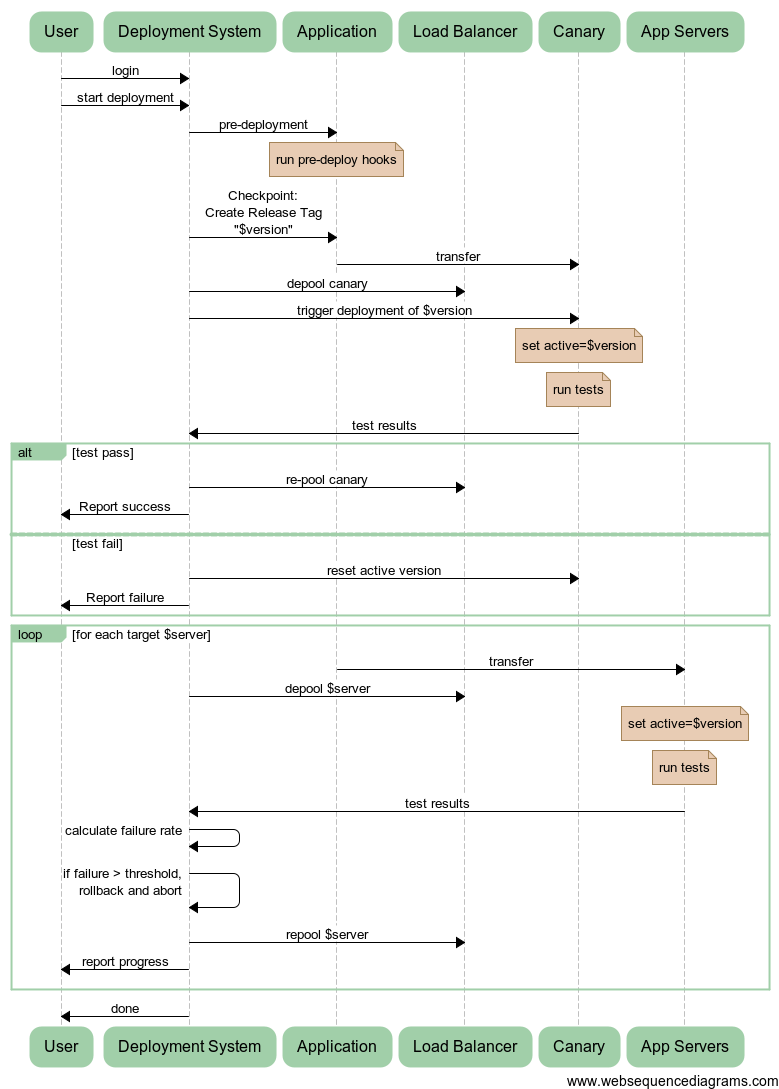
Releasing new features doesn’t always have to happen to all users at once. In applications with a large user base, even small changes can introduce bugs, increase server load, or disrupt previously stable workflows. Feature flags help teams control features through configuration, allowing them to activate functionality for specific groups, monitor performance, and then expand or disable access without requiring a new deployment each time.
Often referred to as feature toggles, feature flags are more than simple on/off switches. When designed well, this mechanism supports gradual rollouts, product experiments, internal testing, and rapid recovery when quality indicators deteriorate. However, flags left unmanaged or improperly secured can add complexity and introduce security risks.
What Are Feature Flags?
A feature flag is a conditional statement in an application that determines whether a specific piece of functionality executes. The application can read flag values from configuration files, dedicated services, or internal settings systems. For example, a new search feature might be activated for staff first, then for five percent of users, before finally becoming available to everyone.
Feature flags differ from deployment. Deployment installs code into an environment, while flags control the behavior of code already present. The two can work together: teams ship code in an inactive state, verify technical readiness, then activate it gradually. It’s important to remember that hiding a button in the interface is not access control. The server must still verify user permissions for every sensitive operation.
Common Types of Feature Flags
1. Release flags
These flags manage the rollout of new features. Teams can merge code earlier but keep features inactive until testing and monitoring are ready. Once stable, the flag should be removed so the code doesn’t carry unnecessary branching logic indefinitely.
2. Experiment flags
Experiment flags divide users between experience variations, such as two page designs. The division must be consistent, and results need evaluation against predetermined metrics. Don’t conclude success based on coincidental number changes that happen to appear during testing.
3. Operational or kill-switch flags
Operational flags allow teams to disable problematic components without stopping the entire application. For example, turning off recommendations that overload the database while preserving core functionality. Fallback paths must remain safe and functional when features are disabled.
4. Permission flags
Flags can help manage feature availability based on subscription tiers or user groups. However, flags are not a replacement for authorization. Critical access decisions must be verified server-side using proper identity, roles, and policies—not just based on values that could be modified from the browser.
Gradual Rollout Strategies
A practical workflow starts from development and testing environments, then moves to internal users, small groups, and finally all users. Before expanding the percentage, establish success indicators such as error rates, latency, transaction failures, memory usage, or support complaints. Compare metrics against baseline conditions so teams know whether changes are genuinely having an impact.
- Prepare initial conditions. Ensure flag code has safe default behavior and features can continue running when the configuration service is unavailable.
- Test in restricted environments. Verify main workflows, access permissions, compatibility, and how to disable features before touching broader user bases.
- Increase exposure gradually. Start with small groups, observe metrics, then expand if no warning signals appear.
- Establish shutdown triggers. Define error rate or latency thresholds that halt or roll back the rollout.
- Close the rollout. Once features stabilize, remove temporary flags and old code through planned changes.
What to Monitor
Flags add behavioral variation to applications. With ten binary flags, many different combinations can theoretically form. Not every combination needs individual testing, but teams must map which combinations affect payments, authentication, user data, or critical business processes.
Record who changed a flag, when the change occurred, the previous value, and the reason for the change. Limit rights to modify production flags and use additional approvals for high-risk controls. Avoid placing secrets, tokens, or personal data inside flag values. Logs also need structuring to prevent leaking sensitive information.
If applications run across multiple regions, ensure configuration changes remain consistent and understand how long changes take to propagate. Overly long caching can leave some users seeing old behavior. Provide ways to check active values and document behavior when flag services become unreachable.
Common Mistakes
- Temporary flags becoming permanent. Every flag should have an owner, purpose, evaluation date, and removal criteria.
- Testing only active conditions. Inactive conditions must also be tested, including fallback paths and data possibly created by new features.
- Relying on flags for security. Hiding features doesn’t prevent direct requests to endpoints. Implement authorization on the server.
- Not preparing rollback procedures. Teams must know who can disable features, how to do it, and how to verify changes actually take effect.
- Changing too many things at once. Launching multiple features together makes it difficult to identify problem causes. Separate changes when possible.
Pre-Activation Checklist
Before rollout, verify the following: flag purpose is documented; owner and expiration are clear; default values are safe; active and inactive testing is available; access permissions are still verified server-side; metrics and logging are ready; shutdown thresholds exist; and rollback procedures are available. For changes touching data, also test whether old data schemas and formats remain compatible.
Teams can maintain flag lists in documentation or task tracking systems. Review these lists regularly, especially after launches complete. Removing old flags reduces code branching and makes application behavior easier for future developers to understand.
Conclusion
Feature flags give teams greater control over when and to whom features become available. With gradual rollouts, proper metrics, and tested kill switches, change risks can be managed without always requiring new deployments. These benefits are most felt when teams establish monitoring and rollback procedures before activating features.
However, feature flags aren’t automatic solutions for all risks. Unmaintained flags increase complexity, and flags don’t replace server-side access controls. Treat every flag as part of the software lifecycle: plan, test, monitor, document, then remove when no longer needed. For related practices, also read guides on securing webhooks and measuring website performance.
Leave a comment