
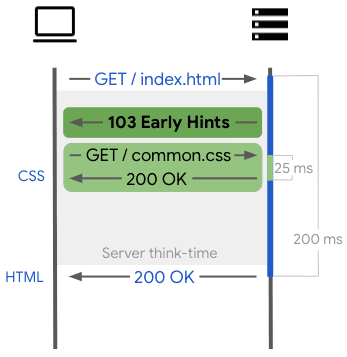
When a visitor opens a webpage, the browser typically has to wait for the server to prepare the HTML response before it knows which stylesheets, fonts, or critical scripts need to be downloaded. If the server takes time to run database queries or render the page, the connection may sit idle with little work to do. HTTP 103 Early Hints helps reduce this gap by sending preliminary hints while the main response is still being processed.
This technique is not a shortcut for every website and does not replace image optimization, caching, or CDN usage. Its benefits are most noticeable when the server needs time to generate HTML, but some critical assets can already be predicted.
What Is HTTP 103 Early Hints?
HTTP 103 is an informational response that can be sent before the final response, such as 200 OK. A 103 response can include Link headers that tell the browser which resources or origins are likely to be needed. Supporting browsers can begin preparing connections or fetching those assets while the server finishes the page.
This specification is described in RFC 8297. Unlike a final response, a 103 response is not page content and does not mean the request is complete. The server must still send a final response containing the actual status and the requested HTML or content.
How Does It Work?
- The browser requests a page, for example
/artikel/. - The server begins preparing HTML. This process may involve database calls, authentication, or dynamic rendering.
- Before the HTML is ready, the server sends a
103 Early Hintsresponse containing hints for assets expected to be important. - Supporting browsers can start connections or downloads earlier.
- The server sends the final response, such as
200 OK, along with the HTML. The browser then uses any already-fetched assets if they match and are still available in cache.
A simple example of header format that can be sent as an early hint:
HTTP/1.1 103 Early Hints
Link: </assets/main.css>; rel=preload; as=style
Link: <https://fonts.example.net>; rel=preconnect; crossorigin
This example is illustrative. Asset URLs, resource types, and server and browser support must be adapted to the actual website. The final response still needs to include correct asset references, and preload configuration must match how assets are used on the page.
When Is Early Hints Worth Using?
Start with pages that serve as main entry points for visitors, such as homepages, popular article pages, or product pages. Look for pages with sufficiently long initial response wait times and critical assets that can be known before HTML generation completes.
- Main stylesheet: CSS required to display the initial part of the page.
- Critical fonts: Fonts actually used for main text, with appropriate cross-origin attributes when needed.
- Connections to important origins:
preconnectcan help prepare connections to third-party asset origins that are genuinely needed immediately. - Critical scripts: only if those scripts are truly needed from the start and their early loading has been carefully tested.
Do not send hints for every asset. Too many preloads can compete with more important resources, waste bandwidth, and actually slow down page display.
Safe Implementation Steps
- Measure baseline conditions. Record server response time, Largest Contentful Paint (LCP), and network waterfall on target pages before changing configuration.
- Identify stable assets. Choose resources that are almost always needed on that page. Assets with frequently changing version names risk making early hints not match the final HTML.
- Check platform support. Ensure the server, reverse proxy, or CDN can actually send 103 responses. Feature support and behavior vary across platforms; do not assume adding regular headers automatically produces 103 responses.
- Configure gradually. Start with one or two critical assets, then ensure URLs,
astypes, and attributes likecrossoriginmatch requirements. - Maintain hints on final response. For compatibility, relevant
Linkheaders can still be included on the final response so browsers that do not use Early Hints still receive the hints. - Test results. Compare measurements under comparable network and cache conditions. Check the Network tab in DevTools, early responses, and whether assets are downloaded once or redundantly.
Risks and Limitations to Understand
Early Hints works based on prediction. If the server hints at assets that end up not being used, the browser may download something unnecessary. If URLs in hints differ from URLs in HTML, the early download may be wasted. Cross-origin redirects on the final response and varying browser support can reduce its benefits.
This feature also does not fix root causes such as slow servers, large images, excessive JavaScript, or poor caching. For pages where HTML is already sent very quickly, ordinary preload or preconnect hints on the final response may be sufficient.
For WordPress site owners, first check whether your hosting or CDN provides Early Hints support and whether the feature can be activated from the management panel. Avoid installing random code snippets claiming to enable 103 status without ensuring the server layer handling responses actually supports it.
How to Assess Whether There Is Benefit
Test the same page before and after configuration, ideally with several repetitions. Watch LCP, initial response time, download order of stylesheets or fonts, and whether transferred byte count increases. Do not rely solely on a single Lighthouse score: also use field data if available, as results can vary by device, cache, and network quality.
The Chrome for Developers documentation on Early Hints explains the flow, asset selection considerations, and browser implementation limitations. Use documentation from your server or CDN to ensure correct configuration.
Conclusion
HTTP 103 Early Hints gives browsers a chance to start network work before final HTML is ready. This technique can help dynamic pages with sufficiently long server processing times, especially when critical assets are stable and easily predictable. However, the best results come from measured implementation: choose few truly important assets, verify platform support, avoid duplicate downloads, then compare metrics before and after. If your server already responds quickly, optimizing cache, images, CSS, and JavaScript may provide greater impact.
Leave a comment