
Browser notifications can help users learn about new messages, order status updates, or important alerts without keeping a site open in an active tab. To build them, developers can leverage the Web Push API together with service workers and the Web Push protocol. One important server-side component is VAPID, a mechanism that helps push services identify the sending application. The implementation needs to be designed with user permissions, subscription security, and message frequency in mind so that notifications feel useful rather than intrusive.
What Are Web Push API and VAPID?
The Web Push API enables web applications to receive messages from a server even when the site is not open in an active tab. Messages are relayed through the browser’s push service, which then wakes the service worker to process them. If appropriate, the service worker can display a notification using showNotification(). This pattern differs from polling, where the page repeatedly requests updates from the server, which can waste bandwidth and resources.
VAPID stands for Voluntary Application Server Identification. This mechanism uses a public-private key pair to identify the application server when sending messages to the push service. The public key is used when the browser creates a subscription, while the private key is kept secret on the server to sign send requests. VAPID is not a replacement for Web Push payload encryption; they serve different functions in the delivery architecture.
Notification Delivery Flow
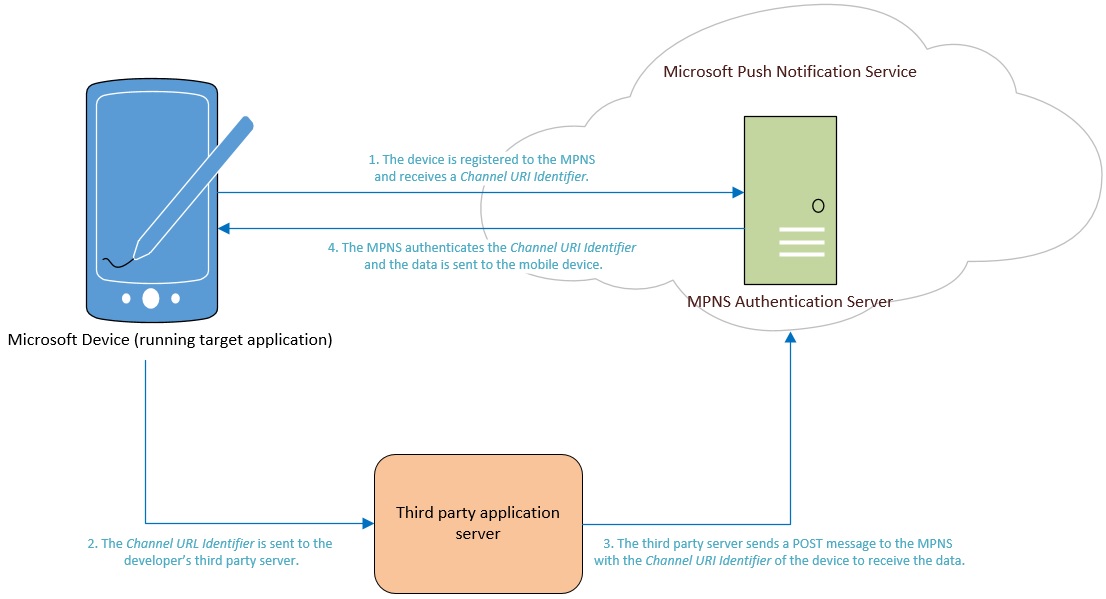
The flow consists of several stages. First, the site requests notification permission after the user understands the benefit and performs a clear action, such as clicking an “Enable notifications” button. Second, the browser ensures the service worker is active, then creates a subscription using the VAPID public key. The result is a PushSubscription object containing the push service endpoint and key material for sending payloads.
Third, the site sends the subscription data to the backend and stores it alongside the relevant account identity or preferences. Fourth, when an event occurs that genuinely warrants notification, the backend sends a message to that endpoint using an appropriate Web Push library. The push service relays the message to the browser; the service worker then decides whether to display a notification. Because subscription endpoints can be used to send messages, treat this data as sensitive information and never expose it publicly.
Prerequisites Before Starting
- Use HTTPS in production. Service workers and push features require a secure context, with exceptions for certain development environments such as localhost.
- Provide a service worker with the correct URL scope and handle the
pushandnotificationclickevents. - Generate a VAPID key pair through a trusted library. Store the private key on the server or in a secret manager; never include it in JavaScript sent to the browser.
- Prepare a backend endpoint to store, update, and delete subscriptions. Validate the user session or token so the endpoint cannot be abused.
Example: Creating a Subscription from the Browser
Once the service worker is registered and the VAPID public key is available, the following code illustrates the core steps. A conversion function transforms the base64url-formatted public key into bytes required by the browser. Example values should be replaced with your application’s public key, and the resulting subscription still needs to be sent to the backend through an authenticated request.
const registration = await navigator.serviceWorker.ready;

if (!('PushManager' in window)) {
  throw new Error('Push API is not supported by this browser');
}

const subscription = await registration.pushManager.subscribe({
  userVisibleOnly: true,
  applicationServerKey: vapidPublicKeyBytes
});

// Send subscription to backend securely.
await fetch('/api/push-subscriptions', {
  method: 'POST',
  headers: { 'Content-Type': 'application/json' },
  credentials: 'same-origin',
  body: JSON.stringify(subscription)
});
This example deliberately does not request permission automatically. Display an explanation first and trigger the subscription flow in response to a user action. The backend should also check authentication, limit repeated requests, and not blindly trust data from the browser.
Displaying and Handling Notifications
In the service worker, the push event can be processed with event.waitUntil() so the browser waits for asynchronous work to complete. Call self.registration.showNotification() with a title, brief body, appropriate icon, and navigation data as needed. When the user clicks the notification, handle notificationclick, close the notification, then focus an already-open tab or open a validated destination page. Avoid accepting arbitrary destination URLs from the payload as they could be exploited to redirect users to malicious sites.
Security, Privacy, and Subscription Management
Do not include passwords, session tokens, recovery codes, or sensitive personal information in notification content. Messages may appear on a locked screen and be seen by others. Use minimal payloads, then direct users to a page requiring authentication to view details. Store the VAPID private key as a secret, limit access to it, and prepare a rotation procedure that considers existing subscriptions.
Subscriptions can expire or become invalid. If the push service returns a status such as 404 or 410, the backend typically needs to mark that subscription for deletion after checking the library response. Provide an option to unsubscribe and respect category preferences, quiet hours, and frequency limits. Do not send promotional messages simply because they can technically be delivered.
How to Test the Implementation
Test the permission flow when the user accepts or denies the request, delivery when the tab is inactive, notification clicks, revoked subscriptions, and disconnected network conditions. Also check behavior on target browsers and operating systems because push policies and notification appearances can vary. Log delivery results, but do not store sensitive payloads in logs. Monitor permission, click, failure, and unsubscribe rates to determine whether notifications are genuinely useful.
Conclusion
The Web Push API suits updates that need to be known promptly, while VAPID helps identify the application server to the push service. A solid implementation requires HTTPS, a service worker, secure subscription storage, failure handling, and clear consent. Prioritize messages that are relevant, concise, and easy to stop. With this approach, notifications become a feature that supports the user experience rather than a source of annoyance or privacy risk.
References: MDN: Push API, MDN: showNotification(), and IETF RFC 8292: VAPID.
Leave a comment